When Grocery Apps Go Wrong: Common Barcode-Scanning Errors and How to Catch Them
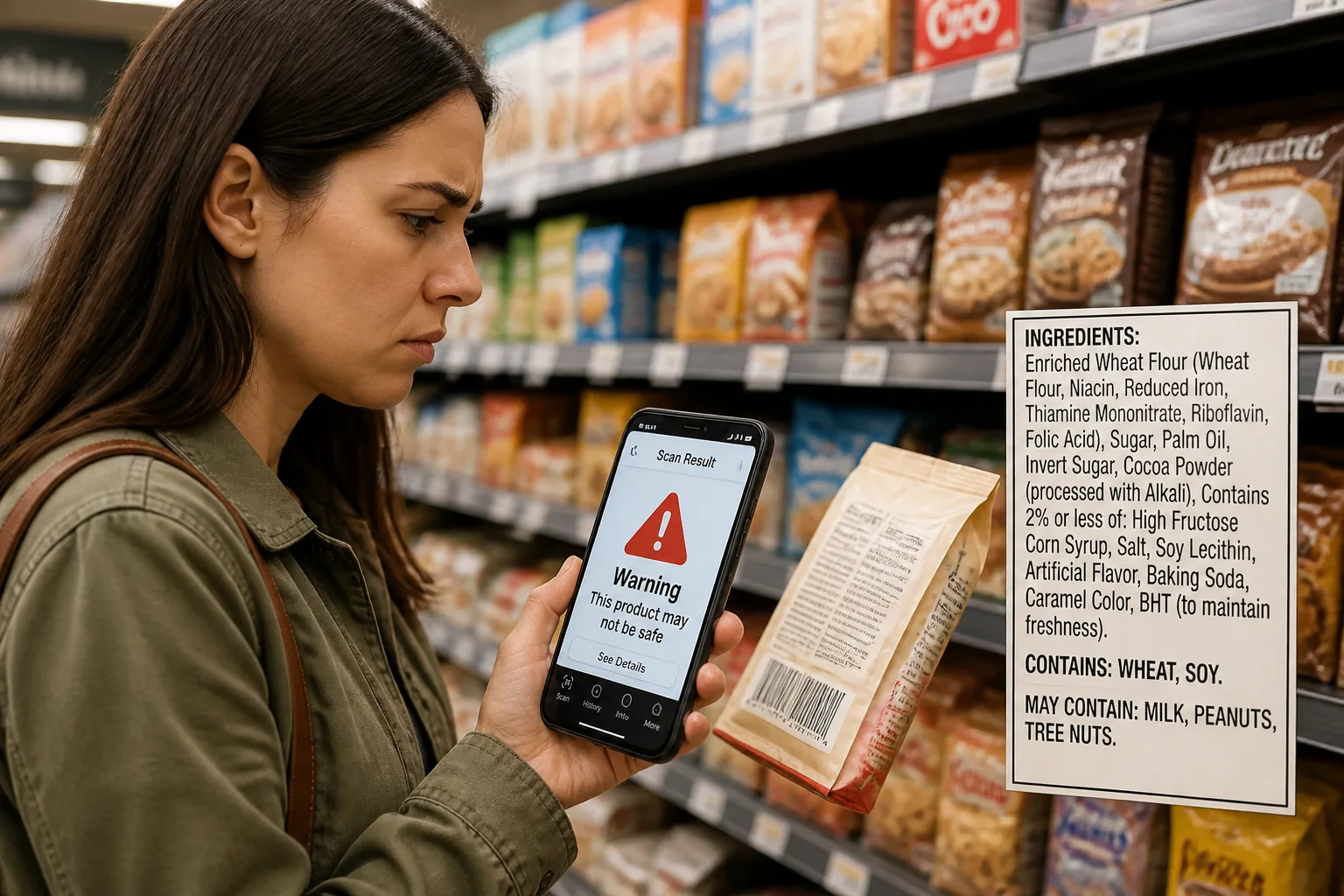
Barcode-scanning apps feel reassuring because they turn a confusing ingredient list into a fast yes-or-no answer. For allergy-conscious shoppers, that speed can be a lifesaver in a busy aisle. But a scan result is only as good as the data behind it, and that data is not always complete, current, or interpreted the same way from one app to another.
That is why a product can look safe in one app and risky in another. Sometimes the app is right and the database is wrong. Sometimes the scan is missing a region-specific label. Sometimes the product was reformulated last month and the app has not caught up yet. The point is not that scanning apps are useless. The point is that they are helpful tools, but not perfect authorities.
Why Barcode Scanning Feels Trustworthy And Why It Isn’t Perfect
Scanning feels trustworthy because it is immediate, visual, and specific. You point the camera at a barcode, the app returns a result, and the uncertainty seems to disappear. That creates a strong sense of confidence, especially when you are comparing a dozen products and trying to avoid a serious reaction.
The problem is that barcode scanning does not analyze the physical product in front of you. It matches the barcode to a record in a database. If that record is incomplete, outdated, or linked to the wrong product version, the result can be misleading. A scan can look precise while still being wrong in subtle but important ways.
Research supports this concern. A 2022 study found that many food allergy apps had inconsistent or low-quality content, especially in the information category, and some failed to provide up-to-date, accurate ingredient and allergen data. In practice, that means a polished interface does not guarantee a reliable result. Source: https://pmc.ncbi.nlm.nih.gov/articles/PMC9753233/
How Allergy-Scanning Apps Actually Match Products and Ingredients
Most allergy-scanning apps work by matching a product barcode, usually an EAN or UPC, to a stored product entry. That entry may include ingredient lists, allergen statements, traces, additive notes, and sometimes a safety judgment generated by the app.
Some apps maintain their own internal database. Others pull from external sources or community-driven catalogs. A systematic review found that many barcode-based allergy and diet apps rely on outside databases such as Open Food Facts, which can introduce missing entries, outdated products, and discrepancies between sources. Source: https://pmc.ncbi.nlm.nih.gov/articles/PMC7527917/
That means the app is often not reading the label on the package you are holding. It is reading a digital copy of that label, and the quality of the answer depends on how recently the record was updated, how the app interprets allergens, and whether the barcode actually maps to the exact variant you bought.
The Most Common Barcode-Scanning Errors Shoppers Should Know
The most common scanning errors fall into a few familiar categories. First, the database can be outdated, so the app shows an old ingredient list. Second, the barcode can be linked to the wrong version of a product, such as a new recipe or different package size. Third, the app may miss regional differences in labeling rules. Fourth, translation and naming issues can obscure the real allergen source. Fifth, the app may treat precautionary statements too broadly or too narrowly.
These errors can create both false positives and false negatives. A false positive happens when an app flags a product as unsafe even though the current on-pack label would not indicate a problem for your specific allergy. A false negative happens when the app says a product is safe but a real allergen risk is present on the package or in a label detail the database missed.
Because allergies can be serious, both types matter. A false positive may waste time or limit choices unnecessarily. A false negative can lead to a reaction, which is why verification still matters even when the scan looks confident.
False Positives: When an App Flags a Product Incorrectly
False positives often happen when the app over-interprets vague or precautionary language. A package that says “may contain traces of nuts” may be flagged as unsafe by a strict app, even if the actual risk is low or the statement is only a voluntary precaution. In other cases, the app may mark a product risky because an old recipe once contained an allergen that has since been removed.
This is especially common with products that are reformulated frequently. A cereal, sauce, or snack bar may have a completely new ingredient list while keeping the same barcode and familiar packaging. If the database has not been refreshed, the app can still be reading the older version.
False positives can also come from conservative allergen logic. Some apps prefer to err on the side of caution and flag anything ambiguous. That can be useful if you want a very strict filter, but it can also make a shopping trip frustrating when the app is reacting to old data, not the current label in your hand.
False Negatives: When an App Misses a Real Allergen Risk
False negatives are the more dangerous mistake. They happen when a product is marked safe even though the package contains an allergen that the app failed to detect. This can occur if the database entry is incomplete, if the barcode matches the wrong product, or if an ingredient name is too vague for the app to interpret correctly.
For example, terms such as “natural flavors,” “hydrolyzed proteins,” or “soy lecithin” can hide allergenic sources or create confusion about what is actually in the product. Ingredient naming issues have long been recognized as a source of misunderstanding for allergy-conscious shoppers, especially when labels use legally permitted but non-specific terms. Source: https://onlinelibrary.wiley.com/doi/10.1034/j.1398-9995.2001.00920.x
A false negative can also happen when the app reads an ingredient list from one region but you are holding a package sold in another region with different mandatory disclosures. In that case, the app may confidently present the wrong conclusion because it is looking at the wrong label version.
Real-World Causes of Misidentification: Database Gaps, Label Changes, and Language Issues
One of the biggest causes of scan errors is a simple database gap. If a product has never been added, or if a smaller package size or flavor variant was not uploaded, the app may substitute a nearby match or show no useful result at all. That is risky because barcode systems assume that every code maps cleanly to one current product record, which is not always true.
Packaging changes create another layer of confusion. Manufacturers may update the recipe, move ingredients around, change supplier sources, or alter allergen statements without redesigning the entire package. The front of the package may look nearly identical while the allergen content has changed behind the scenes.
Language differences matter too. In multilingual markets, the same product can appear with different ingredient formats, translations, or mandated allergen highlights depending on the country. A product sold in one region may not match the version in the app database for another region. This is especially important because EU and U.S. allergen labeling rules are not the same. Under U.S. law, major food allergens must be declared, with sesame added as the ninth major allergen since 2023. In the EU, 14 allergens must be declared, including several that are not mandatory in the U.S., such as celery and mustard. Sources: https://chiwai.eu/en/knowledge/allergen-labeling/allergen-labeling-usa/ and https://sites.manchester.ac.uk/foodallergens/information-for-food-businesses/eu-legal-requirements-on-food-allergen-labelling/
That difference alone can explain why an app says a product is safe in one country and unsafe in another. The app may not be wrong in a broad sense, but it can still be wrong for the exact item on the shelf in front of you.
What to Do When a Scan Result Looks Wrong
If a scan result surprises you, the safest response is to slow down and verify before you trust it. Do not assume the app is correct just because it looks professional. Do not assume the label is safe just because the app is overly cautious either. Treat the scan as a starting point.
The first step is to read the on-pack ingredient list directly. Then look for the allergen statement, such as “Contains: milk, soy,” or any bolded or highlighted allergen terms. If the label uses a vague ingredient name, look for more context on the package or the manufacturer’s website. If the product is imported, check whether the label was adapted for your region’s rules.
If the app and the package disagree, trust the most current on-package information you can access. The product in your hand is the immediate source of truth, while the app is a secondary reference. If the label still seems unclear, avoid the product until you can confirm it with the manufacturer or an updated database.
How to Verify a Product Safely Before You Buy or Eat It
A good verification routine is simple, repeatable, and quick enough to use in a supermarket. Start with the ingredient list. Then find the allergen statement. Next, check for precautionary warnings like “may contain” or “made in a facility that also processes.” Finally, if the product is important to your diet, check the manufacturer website for the most current ingredient information.
This step matters because many label rules require allergens to be declared on-pack. In the U.S., major allergens must be clearly labeled through the ingredient list or a Contains statement. In the EU, allergens must be declared with specific formatting rules. That legal framework helps, but it does not eliminate reformulation, regional variation, or interpretation issues. Sources: https://chiwai.eu/en/knowledge/allergen-labeling/allergen-labeling-usa/ and https://sites.manchester.ac.uk/foodallergens/information-for-food-businesses/eu-legal-requirements-on-food-allergen-labelling/
If you are shopping for a high-risk allergy, it helps to build a habit of double-checking any new product, even when the scan says safe. The extra minute is often worth more than the convenience of a single tap.
What to Look for in an Allergy-Scanning App’s Accuracy and Update Policy
Not all scanning apps deserve the same level of trust. A reliable app should be clear about where its product data comes from, how often it updates, and how it handles unknown or incomplete records. If the app does not explain its data sources, update cadence, or allergen logic, that is a warning sign.
You also want transparency about how the app treats traces, cross-contact statements, and ambiguous ingredients. Cross-contamination warnings are not standardized in every market, so apps that flag them should explain whether they are using a strict precautionary rule or a label-based rule. Without that clarity, two apps can give opposite results for the same product and both appear confident.
The 2022 app-quality study is a useful reminder that design polish does not equal accuracy. Apps should be evaluated on freshness, completeness, and clarity, not just on whether they are fast or attractive. Source: https://pmc.ncbi.nlm.nih.gov/articles/PMC9753233/
How Bokha Helps Reduce These Barcode-Scanning Pitfalls
This is where Bokha is especially useful. Bokha is built for allergy-conscious shoppers who want fast answers without losing sight of safety. It scans product barcodes in less than a second, and it is designed to interpret allergens, traces, and additives with more care than a basic barcode match. You can learn more here: https://findthe.app/bokha
Bokha covers 13 allergens, including lactose, gluten, peanut, egg, soy, fish, shellfish, tree nuts, wheat, mustard, celery, mint, and sulphites. That broader interpretation helps users spot risks that may be missed by simpler apps or by databases that only focus on a narrow set of major allergens.
Just as importantly, Bokha is meant to help reduce the common barcode-scanning pitfalls discussed above by giving shoppers a faster way to review allergen information while still encouraging careful checking of product details. For people who need speed in the aisle but cannot afford sloppy data, that combination is valuable.
Smart Scanning Habits for Safer Grocery Shopping
The safest way to use barcode-scanning apps is to treat them like a helpful assistant, not a final judge. Scan the product, then verify anything important against the package itself. If something looks off, assume the app may be working from outdated or incomplete information until you prove otherwise.
A few smart habits go a long way. Re-scan products after package redesigns. Be extra cautious with imported goods. Watch for vague ingredient names. Pay attention to “may contain” statements, but remember they are precautionary and not always standardized. And if you are buying a product you have never used before, take the extra step of checking the manufacturer’s current ingredient page.
In other words, barcode apps are most useful when they are part of a verification routine. They save time, reduce uncertainty, and can help narrow down safe choices quickly. But because databases can be outdated, labels can change, and regional rules differ, the final safety check still belongs to you. The best shoppers are not the ones who scan the fastest. They are the ones who know when to trust the scan, and when to look twice.